xPortalNet v1.5-Software
Software xPotalNet
Mô tả chi tiết
xPortalNet
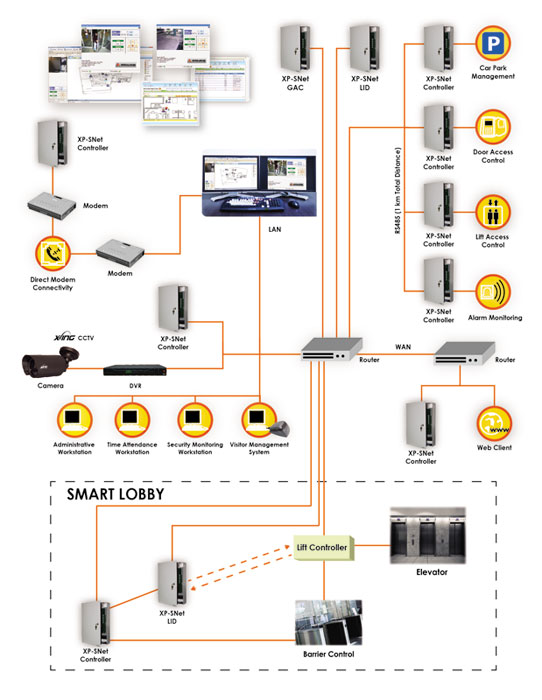
Controller with Modem and LAN enable Multi-Workstation Software Management System
(suitable for large organization that intends to integrate the security system with their existing system like HR System)
xPortalNet Features
CCTV Integration
Tightly integrated to MicroEngine’s line of DVRs for viewing and capturing purposes. DVRs and CCTVs will be shown on the floor plan to ease identification and management.Alarm Monitoring
Supports up to 512 inputs / 256 outputs / 256 LED Mimic outputs with event programming. User notification can be achieved through client applications, email and SMS for maximum flexibility.Lift Controller
Control of up to 96 floors per lift. Supports multiple lobby implementation for large scale projects.Time Attendance
Comprehensive configurations to allow the maximum flexibility in shift and allowance settings. Supports multiple and overnight shifts. Allows for further customisations to suit customer’s requirements.Visitor Management System (VMS)
Integrated VMS module to enable tracking, control and recording of visitors.Floor Plan
Comprehensive floor plan control to enable easy viewing and control device of status.Multiple Workstation
Supports multiple workstation using distributed architecture. Users can login from any workstation on the network via the client application or the web browser.Web Server Support
IIS6 / IIS7 with ASP.NET allows user to login using the web browser from any part of the world.Multiple Connectivity
Devices can be connected to the Server via RS232, RS485 or via LAN / WAN. Supports up to 1024 doors.Mobile Device Support
Allows user login through mobile devices using the Microsoft .NET Compact Framework.
| No | Item | Features |
| 1. | Client Server | Yes. Up to 20 Clients. |
| 2. | System | Door Access/Lift Access/Car Park/Alarm Monitoring/Guard Tour |
| 3. | Card Holder | 200,000 (16 digits) |
| 4. | No. of Door / Readers | 1024 Doors / 2048 Readers |
| 5. | No. of Inputs / Outputs | 1024 Inputs / 1024 Outputs |
| 6. | Time Set / Time Zone | 1024 |
| 7. | System Users | Unlimited |
| 8. | Software Access Control | Yes. User Configurable Command Level Access Control. |
| 9. | Floor Plan System | Yes. Dynamic & with Camera Icon. |
| 10. | Database Supported | MS SQL Server / Oracle |
| 11. | OS | • Windows XP / Vista / 7 Professional (32/64 bits) • Windows Server 2003 / 2005 / 2008 (32/64 bits) |
| 12. | Microsoft .Net | Yes |
| 13. | Communication Supported | LAN / RS485 |
| 14. | Controller Supported | • XP-SNet – IP 5/10 Door with Alarm Monitoring Flexible Architecture Controller • XP-M1000i – IP 1 Door Controller • XP-M2000i – IP 2 Door Controller • XP-P1000i – IP PoE Single Door Controller • GTR1200L – IP Single Door Card Reader Controller • GT3200L – IP Single Door Fingerprint + Card Reader Controller • M1000X – Single Door Card Reader Controller |
| 15. | Time Attendance | Yes. Non-Overnight. |
| 16. | Real Time Export | Yes. User Configurable. |
| 17. | Model | xPortalNet Lite, xPortal Standard, xPortalNet Pro, xPortalNet IS |
* The feature listed here are for the software only. It depends on the choice of the hardware system such as controller, I/O board, readers and computer system for it to work. Kindly contact our representatives for further clarifications.

#image_1243553369 { width: 100%; }
| No | Product Code | Description |
| 1. | XP-SNet5 | IP 5 Door SNet Controller |
| 2. | XP-SNet10 | IP 10 Door SNet Controller |
| 3. | XP-SNet-E5D | 5 Door Extension Board |
| 4. | XP-SNet-E32R | 32 Relay Output Extension Board |
| 5. | XP-SNet-E248S | 24 Supervised Input / 8 Relay Output Extension Board |
| 6. | XP-M2000i | Encrypted IP 2 Door Controller |
| 7. | XP-M1000i | Encrypted IP 1 Door Controller |
| 8. | XP-P1000i | Encrypted IP PoE 1 Door Controller |
| 9. | MiO-S168 | 16 Supervised Input / 8 Relay Output Alarm Controller |
| 10. | MiO-R16 | 16 Relay Output Controller |
| 11. | MiO-L32 | 32 LED Driver Controller (for Mimic Panel) |
| 12. | MK801 | Door Interface Unit |
| 13. | Plato-P80S | Proximity Reader |
| 14. | Plato-P80KLS | Proximity Reader with Touch Sense Keypad & Colour LCD |
| 15. | Plato-C80S | Mifare / CEPAS Reader |
| 16. | Plato-C80KLS | Mifare / CEPAS Reader with Touch Sense Keypad & Colour LCD |
| 17. | XPortalNet Lite | xPortalNet Lite Software c/w 1 USB Key (Special Edition) 3 Client Version, Up to 200 connections Runs on Microsoft SQL Server Database |
| 18. | xPortalNet Std | xPortalNet Standard Software c/w 1 USB Key 3 Client Version, Up to 200 connections With Data Partitioning |
| 19. | xPortalNet /RC | xPortalNet Remote Communication Gateway Add 100 connections capacity to xPortalNet Load balancing for more robust operation Runs on Windows Server 2008/2012 64 bit |
| 20. | GTR1200L | IP Proximity Reader with Touch Sense Keypad |
| 21. | XP-GT3200L | IP FingerPrint + Prox Reader with Touch Sense Keypad |
| 22. | XP-GTR3200LCPX | IP FingerPrint + Prox Reader with Touch Sense Keypad |
| 23. | XP-GT1200LCPX | IP FingerPrint + Mifare + CEPAS Reader with Touch Sense Keypad |

#image_1370781820 { width: 100%; }
| No | Documentation |
| 1. | PDF-Icon Product Brochure: xPortalNet v1.5 |
1. I have purchased xPortalNet software and I need to…
- To install the Microsoft SQL Server 2008 Pre-Installation, see article ID: AA-00275
- To install the Microsoft SQL Server 2008, see article ID: AA-00290
- To install the xPortalNet software, see article ID: AA-00291
- Basic new setup using xPortalNet software, see article ID: AA-00367
2. I have installed the xPortalNet software, but how do I configure software feature
- To configure work schedule, see article ID: AA-00343
- To reset the Fire Alarm triggered status, see article ID: AA-00354
- To enable Auto visitor sign out at the xPortalNet Client, see article ID: AA-00450
- How to back up xPortalNet database, see article ID: AA-00292
- After backup database, if you wish to restore the database, see article ID: AA-00295
- To detach xPortalNet database from SQL Server, see article ID: AA-00297
- To attach xPortalNet database from SQL Server, see article ID: AA-00298
Cannot login to xPortalNet Server due to database down/ yet to be initialized, see article ID: AA-00205
“No connection could be made because the target machine actively refuse it..”, see article ID: AA-00357
“SQL Server does not exist or access denied..”, see article ID: AA-00355
Wrong User ID’s password, see article ID: AA-00323All staff shown “Absent” in daily attendance report, see article ID: AA-00229
Can I use other SQL version than provided one in the CD Content? Yes you can. Further information, see article ID: AA-00338Error “No Data Found!” when get Transaction Reporting, see article ID: AA-00349Cannot login to xPortalNet Server due to database down/ yet to be initialized, see article ID: AA-00205
“No connection could be made because the target machine actively refuse it..”, see article ID: AA-00357
“SQL Server does not exist or access denied..”, see article ID: AA-00355
Wrong User ID’s password, see article ID: AA-00323
All staff shown “Absent” in daily attendance report, see article ID: AA-00229
Can I use other SQL version than provided one in the CD Content? Yes you can. Further information, see article ID: AA-00338
Error “No Data Found!” when get Transaction Reporting, see article ID: AA-00349
Cannot login to xPortalNet Server due to database down/ yet to be initialized, see article ID: AA-00205
“No connection could be made because the target machine actively refuse it..”, see article ID: AA-00357
“SQL Server does not exist or access denied..”, see article ID: AA-00355
Wrong User ID’s password, see article ID: AA-00323
All staff shown “Absent” in daily attendance report, see article ID: AA-00229
Can I use other SQL version than provided one in the CD Content? Yes you can. Further information, see article ID: AA-00338
Error “No Data Found!” when get Transaction Reporting, see article ID: AA-00349
xPortalNet Installation Guide
Microsoft SQL Server 2008 Installation Guide
Guide to Backup xPortalNet Database