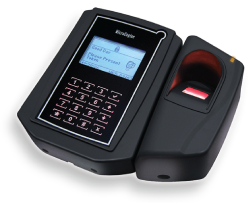
XP-GT10KL / LABX- bộ điều khiển
The XP-GT10KL access controller is designed to meet the specific requirements in the access control sector. Coupled with a large template bank of 10,000 templates, this controller model is specifically designed for access control applications with large number of staffs and users, using the secure access token of fingerprint as verification to grant access into the secured space.
Mô tả chi tiết
Discription
The XP-GT10KL access controller is designed to meet the specific requirements in the access control sector. Coupled with a large template bank of 10,000 templates, this controller model is specifically designed for access control applications with large number of staffs and users, using the secure access token of fingerprint as verification to grant access into the secured space.
Similar to the XP-GT3500L, the XP-GT10KL also comes equipped with a rich suit of features and capabilities. Transaction record capacity is still maintained at the impressive 20,000 transactions to cater to applications ranging from residential, commercial, industrial and even public sectors. The XP-GT10KL also provides 99 numbers of Time Set and Time Zone configurations to allow users the full flexibility to control different access level of each user up to the minute. The XP-GT10KL also is able to be operated under the Time Attendance mode to allow integrations with payroll systems in recording staff attendance.
| No | Features | Functions |
| 1. | Card User Memory | Up to 10,000 Users (each with 1 fingerprint template) |
| 2. | Transaction Records | 50,000 |
| 3. | Single Unit Reader, Keypad & Controller | Yes |
| 4. | Build-In Card Reader | Yes – EM Card (Mifare Card with Mifare Sector Reading Model Available) |
| 5. | Access Operation Mode | Card Only, Card + PIN, Fingerprint, Card + Fingerprint, PIN + Fingerprint, Card + PIN + Fingerprint |
| 6. | Fingerprint Template Capacity 1:N | 10,000 1:10,000 |
| 7. | Display | 128 x 64 Graphic Display with Back Light |
| 8. | Keypad | Touch Sense Keypad with Backlight |
| 9. | Time Set & Time Zone | Yes (99 sets) |
| 10. | Holiday Dates | 40 Sets |
| 11. | Auto PIN | Not Available |
| 12. | Built-in Real Time Clock with Battery | Yes |
| 13. | Car Park Mode External Entry Reader | No |
| 14. | Exit Reader | Yes – Use MAS-RBM to connect the Entry and Exit Unit |
| 15. | Exit Push Button | Yes – with Time Zone Control |
| 16. | Support Wiegand 26-bit Reader | Yes |
| 17. | Anti-Passback | Yes |
| 18. | Controller Operation Mode | Access Control Mode |
| 19. | Supports Programming Through Keypad & LCD at the Reader | Yes |
| 20. | Lock Control, Door Sensor & Exit Button Input | Yes – Through MAS-RBM |
| 21. | Configurable Lock Release Time | Yes – 0-99 secs. |
| 22. | Configurable Door Open Time | Yes – 0-99 secs. |
| 23. | Auto Lock Release Time Zone | Yes |
| 24. | Sensor & Output | No |
| 25. | Data Flash Memory | 32MBit |
| 26. | Onboard Buzzer | Yes |
| 27. | Communication Ports | RS485 / LAN |
| 28. | Can be Linked to PC for Software Control | Yes |
| 29. | Power | 12VDC |
| 30. | Dimension | 131mm (H) x 158mm (W) x 65mm (D) |

#image_1455395424 { width: 100%; }
| No | System | Requirements |
| 1. | CPU (Recommended) | Intel Core i5-5220U, 2.2 GHz or Higher |
| 2. | RAM (Minimum) | 4 GB |
| 3. | OS | Microsoft Win 7/8/10 Pro, 2003/2008 Server (Home/ Starter /Single Editions Not Supported) |
| 4. | Microsoft.Net Framework | Yes (Version 3.5) |
| 5. | Ethernet & Serial Port | Yes |
| 6. | USB Port | Yes |
| 7. | Display (1024 x 768 x 16 Bit Colours) | Yes |
| 8. | Mouse / Keyboard | Yes |
| 9. | Hard Disk (Free Space) | 50 GB |
FAQ
1. I have purchased XP-GT3500L and I need to…
- To install the controller, follow the wiring connection diagram provided, see article ID: AA-00362
- To configure the uplink connection, see article ID: AA-00267 if using network connection, or see article ID: AA-00269 if using RS485 connection
- To configure down link connection, see article ID: AA-00270
- To configure finger print template, see article ID: AA-00453
2. I have installed XP-GT3500L at my site, but how do I configure the controller
- To reset the controller to factory default setting (Coldstart), see article ID: AA-00461
- To set the controller as entry and exit door for single door only, see article ID: AA-00211
- To add staff record at the controller, see article ID: AA-00455
- To add/ enrol finger print at the controller, see article ID: AA-00236
- To save/ backup the finger print template from the controller to the software, see article ID: AA-00234
- To set the Verification Mode to “Finger Print only”, see article ID: AA-00316
- To delete finger print template from the controller, see article ID: AA-00239
- Get error “Wrong Token Type” after scan the finger prin, see article ID: AA-00315
- Unable to add finger print and display the Fingerprint already exist, see article ID: AA-00238
- The controller memory has been cleared or deleted, how to re-send the user’s fingerprint template to the controller, see article ID: AA-00237
XP-GT/GTR Setup Guide (Network Setting)